


Showing posts with label Premium. Show all posts

DZS Content Scroller is a solid, advanced, fully responsive jQuery plugin to scroll content. It can be a html content scroller, a banner rotator or even a image gallery due to the fact that it support inline content and it includes two viewing modes. The first one, is to automatically calculate how many elements fit in the container and then scroll them, and because it is responsive, it will auto adjust elements to your screen size. The second one is to resize only one element to fit in the container, this is ideal for galleries or cases where you need to showcase only one item on the full width.
Features:
- touch optimized – touch the boxes and throw them with your fingers just like in a native application
- responsive – with the Testimonial Rotator all of your clients will experience a smooth experience, wheter on HD Desktop Computer, Tablet or Phone
- easy install- documentation, samples and preview build are provided so you can start up / include Testimonial Rotator in your project in minutes
- compatible with all major browsers, including IE – compatible from IE7 to IE10, Chrome, Safari and Firefox
- iPhone / iPad optimized – this gallery has been optimized for Apple touch devices
- Android optimized – this component has been tested on Android 4.0 and works awesome
- developer / css powered skins – the gallery css is divided into two parts – functional and estethic so it’s very easy to make your own skin
- developer / SASS powered – this component’s CSS has been built on top of SASS which means SASS users will have an easy time modifying the skins. For non-SASS users it’s no problem either because CSS files ( generated by SASS ) are provided
- webmaster / SEO friendly – built with search engine optimization on mind from the ground up, the Testimonial Rotator uses non hidden valid html markup to build the widget
Updates
UPDATE 1.20 [ 11/03/2013 ]
- added slideshow mode
- added needs-loading option for items that need the first image loaded before showing the slide ( can cause height calculation issues if not set for big images )
UPDATE 1.10 [ 03/02/2013 ]
- added jQuery 1.9 compatibility
What do you get?
- Content Scroller jQuery Plugin – get creative!
- sample configuration from the preview – you get exactly the configuration and files you see in the in the preview so you have a good starting point for your customizations
- documentation – extensive documentation on how to install in your project & configure the plugin
- psd files – overlay buttons design attached
- free updates – even if the value of this gallery increases with upcoming updates, you will get them for free
- free support – for installation via my forum -> http://digitalzoomstudio.net/support/ this is the fastest form of support
FAQ
It looks great! Question – Does it work with Twitter Bootstrap right out of the box? or do I need to change something?
It works great. It was built on Bootstrap to be natively responsive from the start. + the preview framework is Bootstrap


ChangeLog:
- Version [1.1] The Slider is Now responsive
- Version [1.2] Improved response + open first slide on load option
Credits: Lemonsanver Easing Plugin zachstronaut css transform
Properties:
- Easy to style.
- Responsive.
- Multiple pre-styled Captions.
- Multiple captions animations.
- Choose among multiple easing methods.
- Ability to add multiple sliders in one page without interfering.
- Expand by hover or click events.
- Easy to set up with Detailed documentation.

Parallax Effect – Full Collection of Sliders includes 4 types of sliders:
- Classic
– Perpetuum Mobile
– Mouse Interaction
– Ultra
NEW: From these sliders you can create, in minutes, sidebar banners.
Classic:
- touch screen navigation support for mobile
- responsive design. Available parameter to disable responsive behaviour
- 2 predefined skins: bullets & thumbs
- layered elements: permits almost unlimited number of layers, images or texts.
- animated text from any direction: top, bottom, left and right. CSS and HTML formated
- external url link parameter for each slide
- target parameter: _blank or _self
- width & height parameters
- autoplay parameter
- loop parameter
- show/hide controllers parameter
- show/hide bottom thumbs parameter
- circle timer parameters for color, dimensions, transparency
- you can include YouTube, Vimeo & HTML5
- you can insert multiple instances in the same page with the same skin or using a different skin.
- detailed help documentation included. Also, all the examples present in the preview are included in the download .zip
- touch screen navigation support for mobile
- responsive design. Available parameter to disable responsive behaviour
- 2 predefined skins: bullets & thumbs
- layered elements: permits almost unlimited number of layers, images or texts.
- animated text from any direction: top, bottom, left and right. CSS and HTML formated
- perpetuum move: define multiple backgrounds elements that can have a perpetuum move. For each background you can enable or disable this behavior.
- continuous move for layers: you can choose which layer will move continuously between 2 positions just by setting additional parameters
- rotary motion for layers: you can choose which layer will rotate just by setting additional parameters. This feature is working for all browsers, except IE7 & IE8
- width & height parameters
- external url link parameter for each slide
- target parameter: _blank or _self
- autoplay parameter
- loop parameter
- show/hide controllers parameter
- show/hide bottom thumbs parameter
- circle timer parameters for color, dimensions, transparency
- you can include YouTube, Vimeo & HTML5
- you can insert multiple instances in the same page with the same skin or using a different skin.
- detailed help documentation included. Also, all the examples present in the preview are included in the download .zip
- touch screen navigation support for mobile
- responsive design. Available parameter to disable responsive behaviour
- 2 predefined skins: bullets & thumbs
- layered elements: permits almost unlimited number of layers, images or texts.
- animated text from any direction: top, bottom, left and right. CSS and HTML formated
- mouse interaction: by moving the mouse over the slider, the elements will react. Available parameter to disable this behavior.
- continuous move for layers: you can choose which layer will move continuously between 2 positions just by setting additional parameters
- rotary motion for layers: you can choose which layer will rotate just by setting additional parameters. This feature is working for all browsers, except IE7 & IE8
- width & height parameters
- external url link parameter for each slide
- target parameter: _blank or _self
- autoplay parameter
- loop parameter
- show/hide controllers parameter
- show/hide bottom thumbs parameter
- circle timer parameters for color, dimensions, transparency
- you can include YouTube, Vimeo & HTML5
- you can insert multiple instances in the same page with the same skin or using a different skin.
- detailed help documentation included. Also, all the examples present in the preview are included in the download .zip
- touch screen navigation support for mobile
- responsive design. Available parameter to disable responsive behaviour
- 2 predefined skins: bullets & thumbs
- layered elements: permits almost unlimited number of layers, images or texts.
- animated text from any direction: top, bottom, left and right. CSS and HTML formated
- asynchronous move for backgrounds: Define multiple backgrounds elements that can have an asynchronous move, customizable through parameters.
- width & height parameters
- external url link parameter for each slide
- target parameter: _blank or _self
- autoplay parameter
- loop parameter
- show/hide controllers parameter
- show/hide bottom thumbs parameter
- circle timer parameters for color, dimensions, transparency
- you can include YouTube, Vimeo & HTML5
- you can insert multiple instances in the same page with the same skin or using a different skin.
- detailed help documentation included. Also, all the examples present in the preview are included in the download .zip

Showbiz Pro is a highly customizable plugin to show you or your customer’s services, portfolio items, blog contents… basically all business information thinkable.
What makes this item unique is that you can define everything(Captions, Preview, Details etc.) via CSS or HTML or jQuery plugin option which gives you Unlimited Layout Possibilites. Please check out the examples to see for example how a small preview view expands to a rich detailed panoramic view. All fits nicely in the designated area.
Try our examples, check the sourcecode toggle and also resize the screen for a responsive preview. Or check it out with your tablet (of course it works on every modern browser (including IE8) and on iOS(iPad,iPhone) and Android mobile devices)!
The given examples of the preview are included in the download zip and mean an awesome starting point to build your own Showbiz out of it. Put the JS and CSS links in the head/footer of your HTML site and build an unsorted list of items and insert your HTML.
The images seen in the preview are licensed from fotolia and are NOT included in the download. The download of this template contains placeholder images with dimension labels.
Product Featured :
- Fully Responsive & Mobile Optimized (Smartphones & Tablets)
- Drag & Scroll Function
- Smart Loading of Embeded Videos (YouTube and Vimeo)
- Light Weight jQuery and CSS
- Retina Ready Icons via Font Face Icons
- Unlimited Slides
- iPhone & Android Swipe Touch enabled
- FullWidth and Single Width Reveals
- Customizable 100% via Plugin Parameters / CSS / HTML
- Easy installation in your Website
- Fast CSS3 & jQuery Engine
- Fancybox 2 Lightbox Plugin on Multi Domain License included ($89 Value)
- Detailed Documentation included!
- Example pages included!
- Set Amount of Entries in 4 Level for Responsive Look
- Drag & Scroll Function
- Navigation Arrow can be added anywhere in the DOM
- Predefined Helper Classes
- FullWidth and Single Width Reveals
- Smart Loading of Embeded Videos (YouTube and Vimeo)
- Undependent or Different height of Entries
- One by One or Intelligen Page Scroll
- Various and Dynamic Height of Fullwidth Reveal
- 5+1 Demo Files in Source
- Different Layout within one Teaser possible
- Leight Weight jQuery and CSS
- Fits in any Container
- Clever Prepared Helper Classes
- Unlimited Layout Possibilites

Responsive KenBurner Slider jQuery Plugin
What is it?
Responsive KenBurner Slider jQuery Plugin is the premium way of using a slider in your website. A combination of Ken Burns Effect, state-of-the-art Slider, Text Animations and Responsive rebuilding defines this slider.
Customize this slider with just a little HTML and CSS to your very needs. Give each slider some captions to transport your message. Use your Ken Burns Animated banner elements with the possibility of playing YouTube and Vimeo clips in a special detail view with describing text.
Bug Fixing 16.05.2012
- Plugin Conflicts has been solved within the cssAnimation Plugin
Google Chrome Bug / Fade Transition Bug 09.05.2012
The lates GoogleChrome Update (18.0.1025.168) has some Bug in the Canvas Rendering. Due this Bug the Fade Over transition will not work fine between the slides. You will see some Flickering by changing between slides with fade Transitions. Since this problem does not exist in IE or in FF we can only provide you a small workaround where the Plugin automatically ignore fade transitions in Google Chrome. If you interested, please download our next update !
Via the option repairChromeBug:”on” you can decide whenever you wish to change automatically the fade transition against slide transition in Chrome.
Additional Feature Update from 8th of March 2012 :
- Responsive Function Extended with Proportional Image Resizing function.
- KenBurn function Turn on/off Option added per Slide.
Additional Feature and Bug Fixing Update from 1st of March 2012 :
- Responsive Function Extended with Full Proportional Sensibility. Height will be set Automatically dependend on Start Height and Start Width Proportions.
- Removing Captions Bug Fixed
- Hide Thumbnails on/off Bug Fixed
- Optional Bulletpoint Toolbar
So what is so new?
It is responsive. Meaning: It fits your screen size. Whether you use a desktop pc, a netbook, an Ipad, an Android Phone, an Iphone the Kenburner will always fit to the perfect width and height.
All in all it works on every modern browser (including IE7 /8) and on mobile devices!
The Ken Burns effect is totally customizable: Start-, End Point, Zoom In or Out, Zoom Factor are all in the different slider parameters.
And do not forget that you not only can animate your picture transitions and the Ken Burns Effect but the elements (Text, Icons, Pics…) on each slide too. You can create unlimited amounts of objects and let them appear with style!
Does this really run on all browsers and on mobiles?
Sure it works on every modern browser (including IE7 /8) and on iOS(iPad,iPhone) and Android mobile devices . Touch swipe for iOS and Android mobile devices is of course included.
What are the features?
- Responsive Design
- Image and Thumbs fully resizable
- Optional Ken Burns effect
- Unlimited Caption Layers
- Unlimited Slides
- Customizable Ken Burns Effect (StartEnd-Position and Zoom or Random)
- iPhone/iPad & Android Swipe Touch enabled
- jQuery Conflict free plugin
- Customizable 100% via Plugin Parameters / CSS / HTML
- Easy installation in your Website
- Special Easing
- Example Pages included
- 2 Pictures are used for Hover-Effects, so you can build every effect you wish (blur, greyscale…) with your favorite image tool
Is it hard to implement?
No! It is the typical way of implementing a jQuery plugin. You just need to know little HTML and Javascript.
The given example is an awesome start point to build your own slider out of it. Put the JS and CSS links in the head of your HTML site and put in some DIV elements for your items.
The given example is an awesome start point to build your own slider out of it. Put the JS and CSS links in the head of your HTML site and put in some DIV elements for your items.
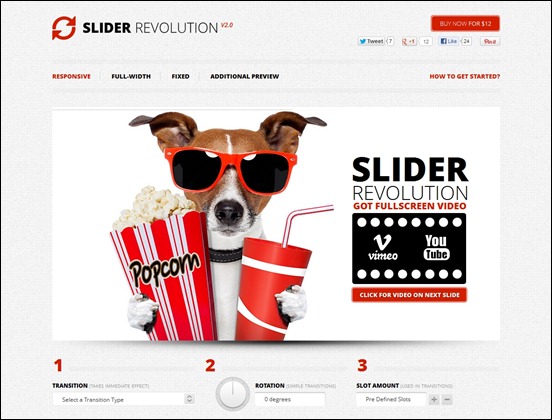
The Revolution is here!
Turn simple HTML markup into a responsive(mobile friendly) or fullwidth slider with must-see-effects and meanwhile keep or build your SEO optimization (all content always readable for search engines).
See the heaps of custom transitions/animations for each object on the page! Customize this slider with just a little HTML and CSS to your very needs.
This plugin features tons of unique transition effects, an image preloader, video embedding, autoplay that stops on user interaction and lots of easy to set options to create your own effects. All customization can be handled via jQuery Options, HTML 5 data-attributes and CSS!
Gallery
-
Bagaimana menghilangkan footer link pada plugin Jcomments? Baca deh baik-baik, dan semoga bermanfaat. Untuk menghilangkan footer link ...
-
Tanpa adanya kotak komentar untuk sekedar memberikan komentar atau bertanya, rasanya masih ada yang kurang. Dan tema itulah yang akan say...
-
Enter URL: (e.g. yourwebsite.com) Po...
-
Apa itu Alexa Rank? Sebelum ke cara-cara meningkatkan Alexa Rank, ada baiknya Anda mengetahui dulu apa itu Alexa Rank. Bila dise...
-
How to Install a Slide Show Widget In Blog Posts Maybe you are confused with how to make it, for example, there is in addition to this...
-
 Free Keyword Research Tools 1. Google Adwords Keyword Research Tool Google adwords external keyword tool is the best tool for k...
 -
 In this article, you will find the best of the images and the jQuery Sliders Plugins so that you can take advantage of them and produce st...
 -
 Comment box is one of the features that must be present in a website / blog as a means of interaction between the visitors with the owner ...
 -
 Untuk membuat Iklan melayang seperti ini sangatlah mudah, hanya dengan beberapa langkah, maka Iklan Melayang tersebut sudah bisa terpas...
 -
 Blog is short for web log is a web application that resembles the form of writings ( published as a post ) on a public web ...
